
Know YourMoney Story
Finally see where every dollar goes. Create your own categories, train once, and let SpendSpace auto-categorize forever.
The Personal Finance App Built Around You
SpendSpace is a personal finance and budgeting app that puts you in full control of your money. Unlike Mint or YNAB, SpendSpace lets you create fully custom expense categories tailored to your actual spending habits. Upload bank CSV files or connect your accounts directly, and SpendSpace automatically categorizes every transaction using the keyword rules you define — no rigid presets, no forced categories.
Whether you're tracking groceries, freelance income, date nights, or pet expenses, SpendSpace gives you a clear picture of where every dollar goes. AI-powered insights surface spending patterns, flag unusual charges, and help you build better financial habits — with bank-level security, direct bank connections via Teller API, and investment portfolio tracking. All for less than a cup of coffee per month. Start your free 3-month trial today.
Built Different
Most finance apps force you into their categories. SpendSpace learns yours. Create once, auto-categorize forever.
Your Categories
Your RulesCreate expense categories that match YOUR life. Not generic labels—categories like 'Date Nights', 'Side Hustle Expenses', or 'Dog Stuff'.
Train Once
Auto-Categorize ForeverAssign a keyword to a category once. Every past and future transaction with that keyword is automatically categorized. Magic.
See Patterns
Make DecisionsDiscover where your money actually goes. Compare months, spot trends, and make informed choices—not restricted ones.
Join thousands who've taken control of their finances
Security First
Your financial data deserves enterprise-grade protection. We use the same security infrastructure as major banks.
Bank-Level Security
256-bit AES encryption protects every piece of your data
Read-Only Access
We can view transactions but never move your money
Google Cloud KMS
Enterprise-grade key management for sensitive data
Your Data, Your Control
Export or delete your data anytime. No questions asked.
Powered by Industry Leaders

See SpendSpace In Action
Real features, real screenshots, real results
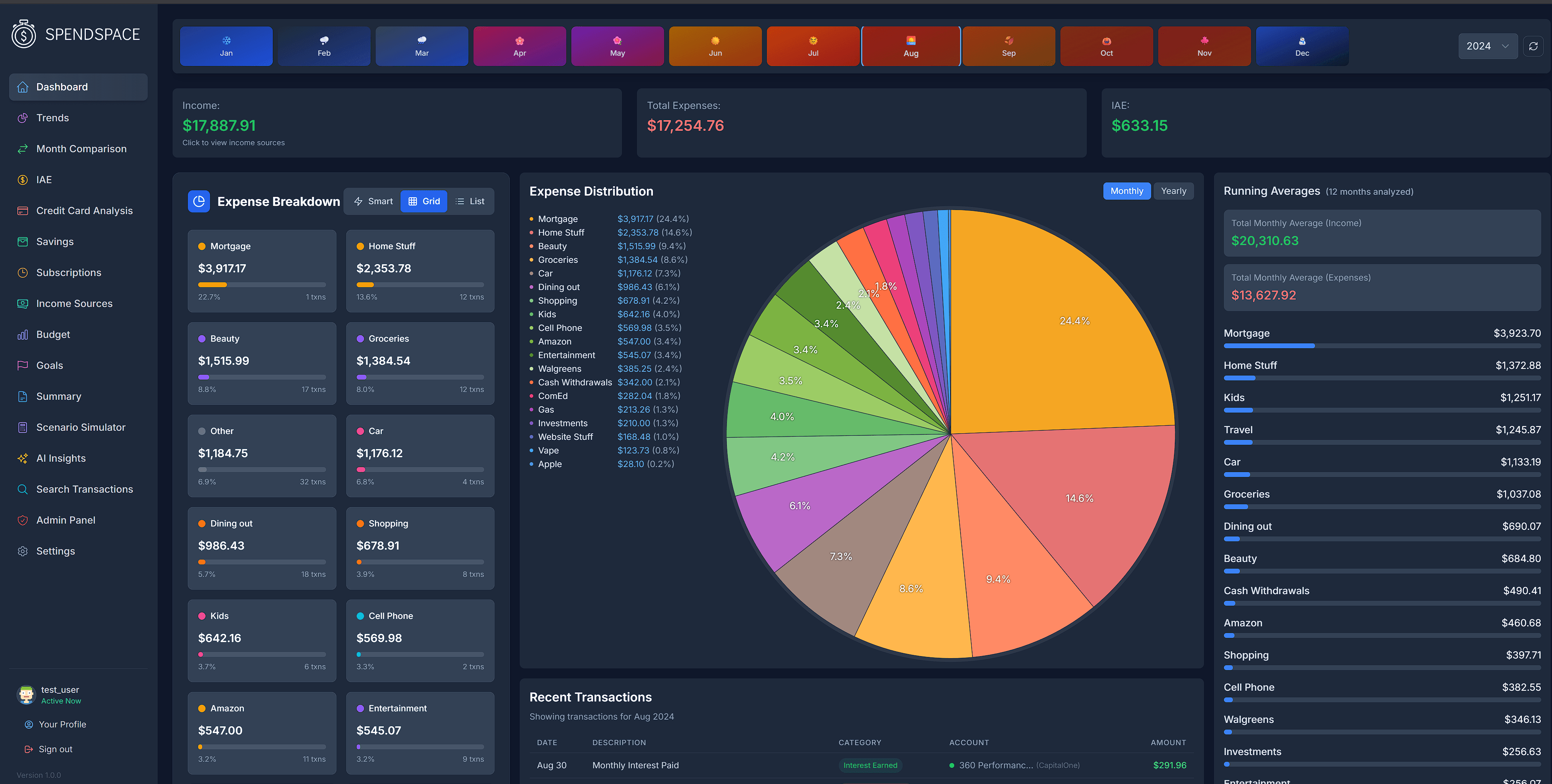
Complete Financial Overview
See all your accounts, spending, and income in one beautiful dashboard. No more switching between apps.
- Real-time account balances
- Custom category breakdown
- Monthly spending trends
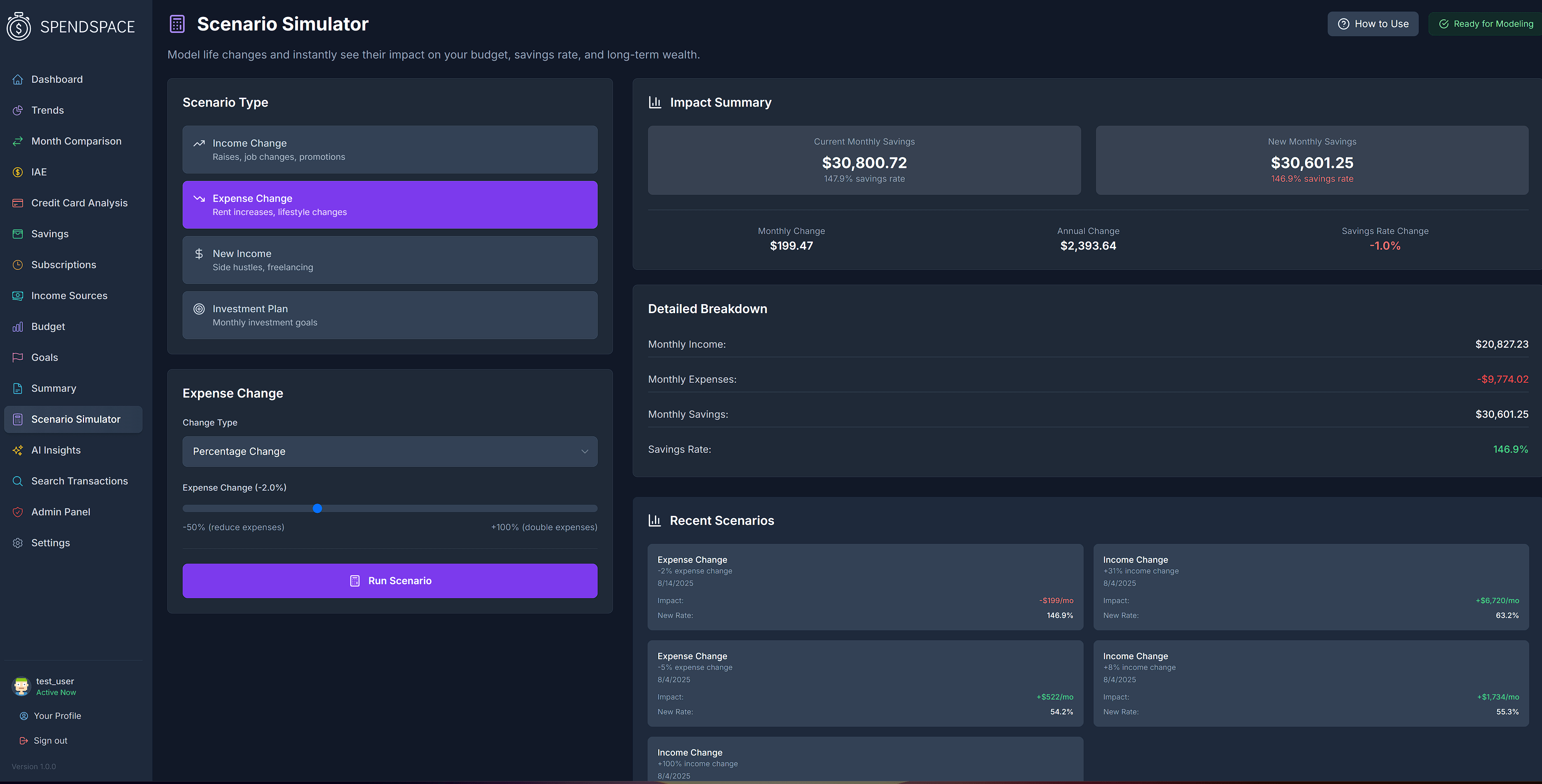
Plan Your Future with Scenario Simulator
What if you got a raise? A new expense? Model life changes and instantly see the impact on your budget and savings.
- Income change modeling
- Expense impact analysis
- See your new savings rate instantly
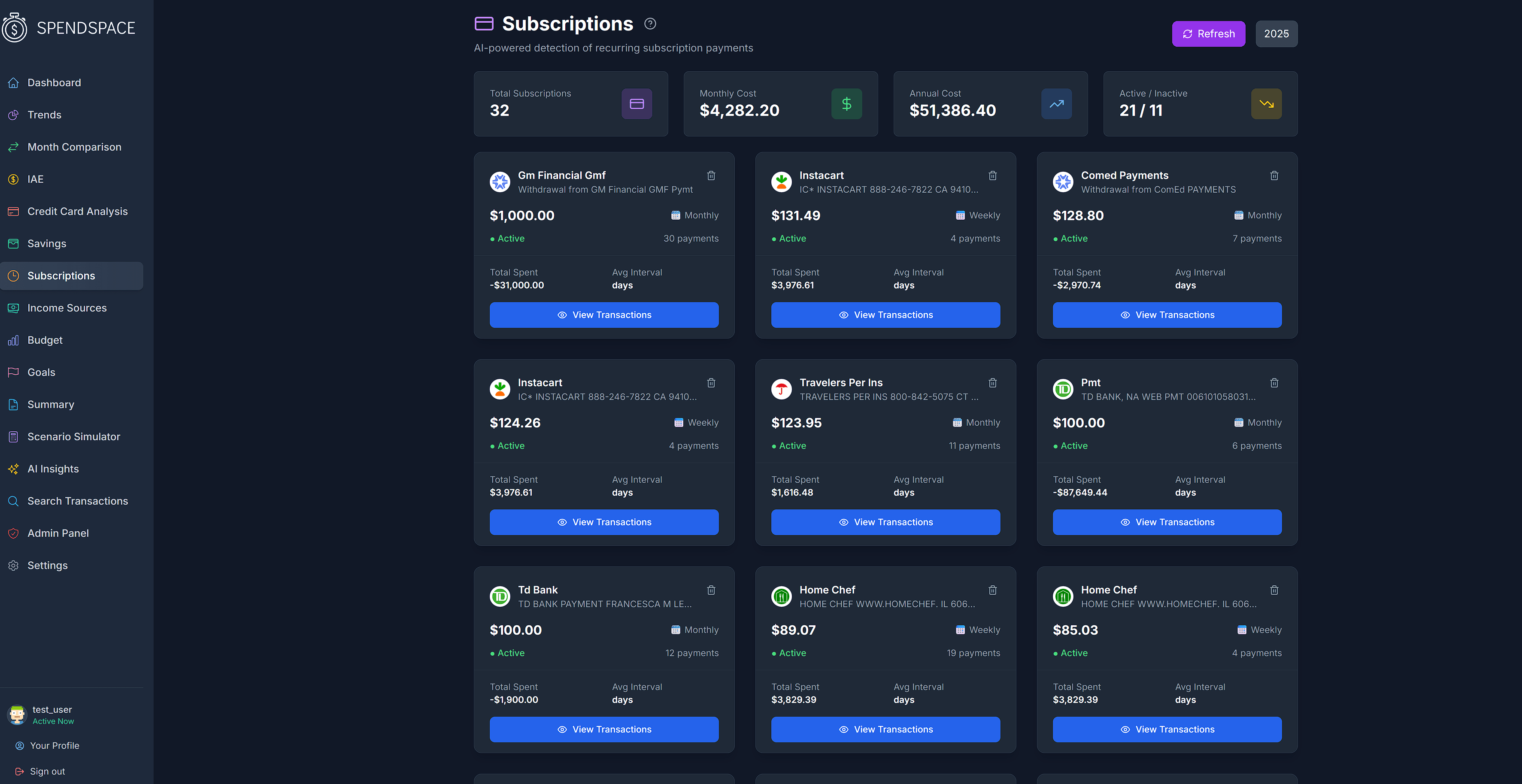
Find Forgotten Subscriptions
AI-powered detection finds every recurring payment. See your true annual subscription cost—you might be surprised.
- Automatic subscription detection
- Annual cost visibility
- Active vs inactive tracking
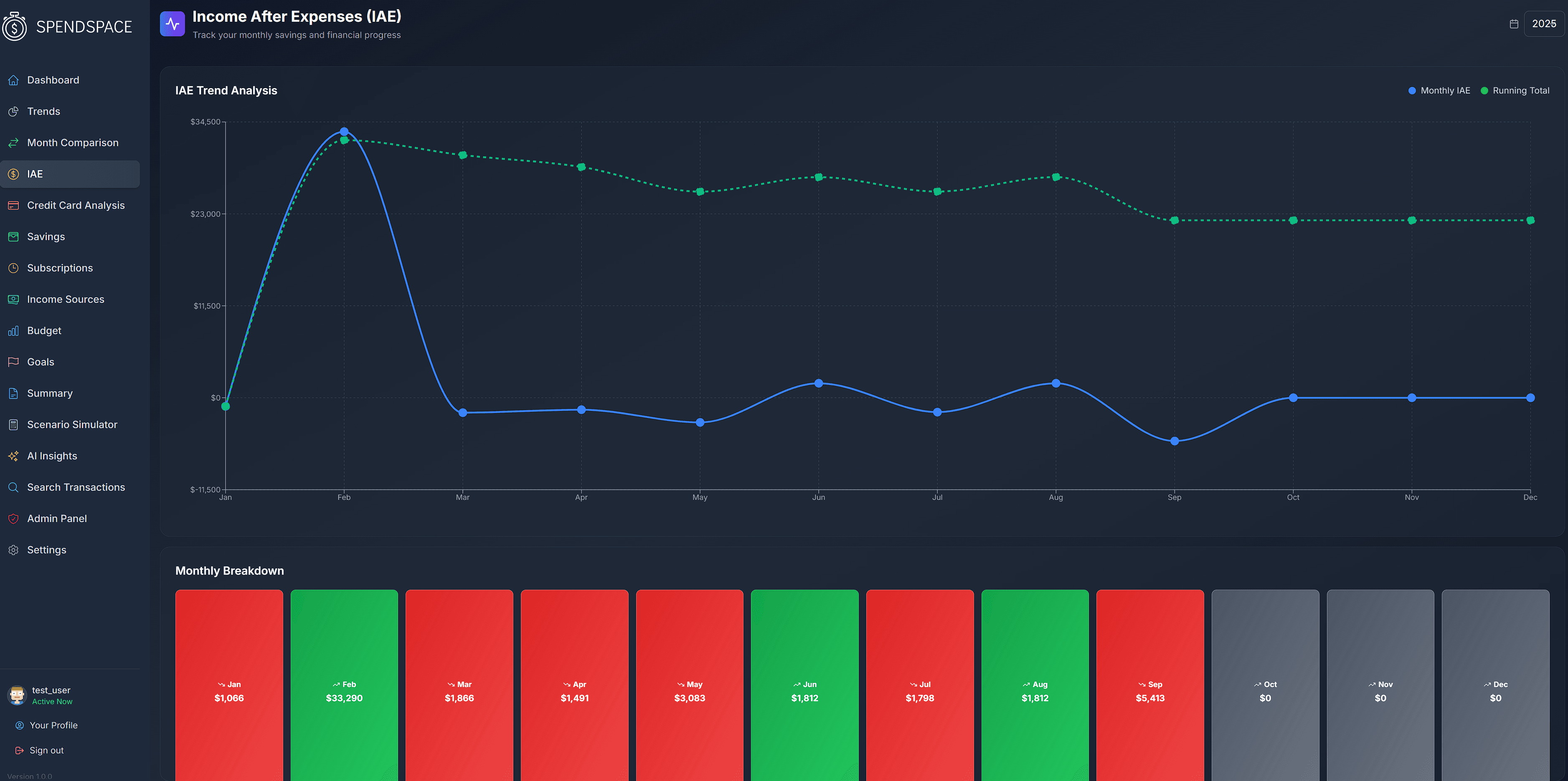
Know If You're Winning Each Month
Income After Expenses shows your financial health at a glance. Green means you're ahead, red means time to adjust.
- Monthly win/loss visualization
- Running total tracking
- Instant financial health check
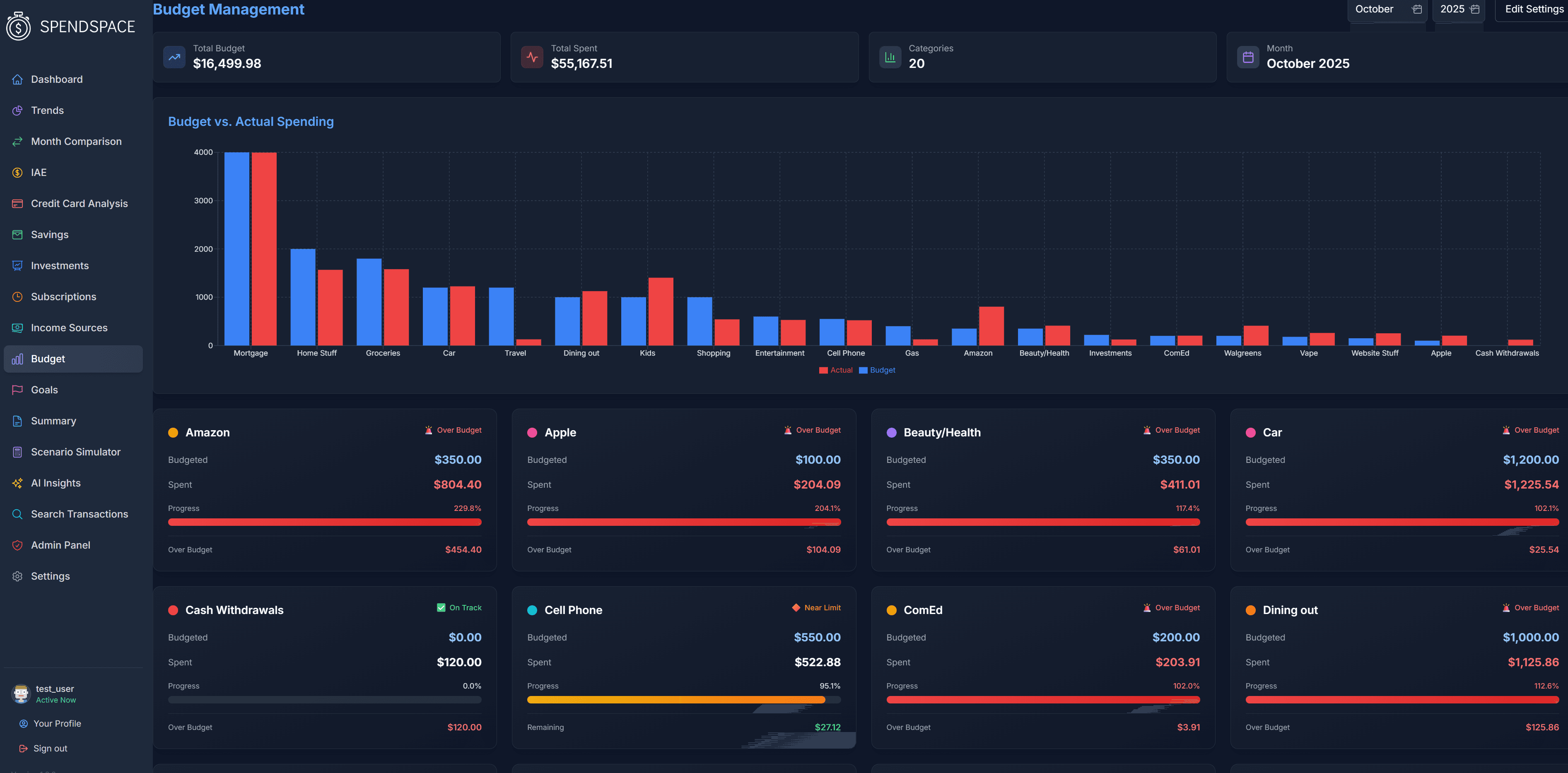
Budgets That Adapt to You
Set budgets on your custom categories. Get alerts when you're approaching limits, not after you've overspent.
- Category-specific budgets
- Email alerts at your threshold
- Visual progress tracking
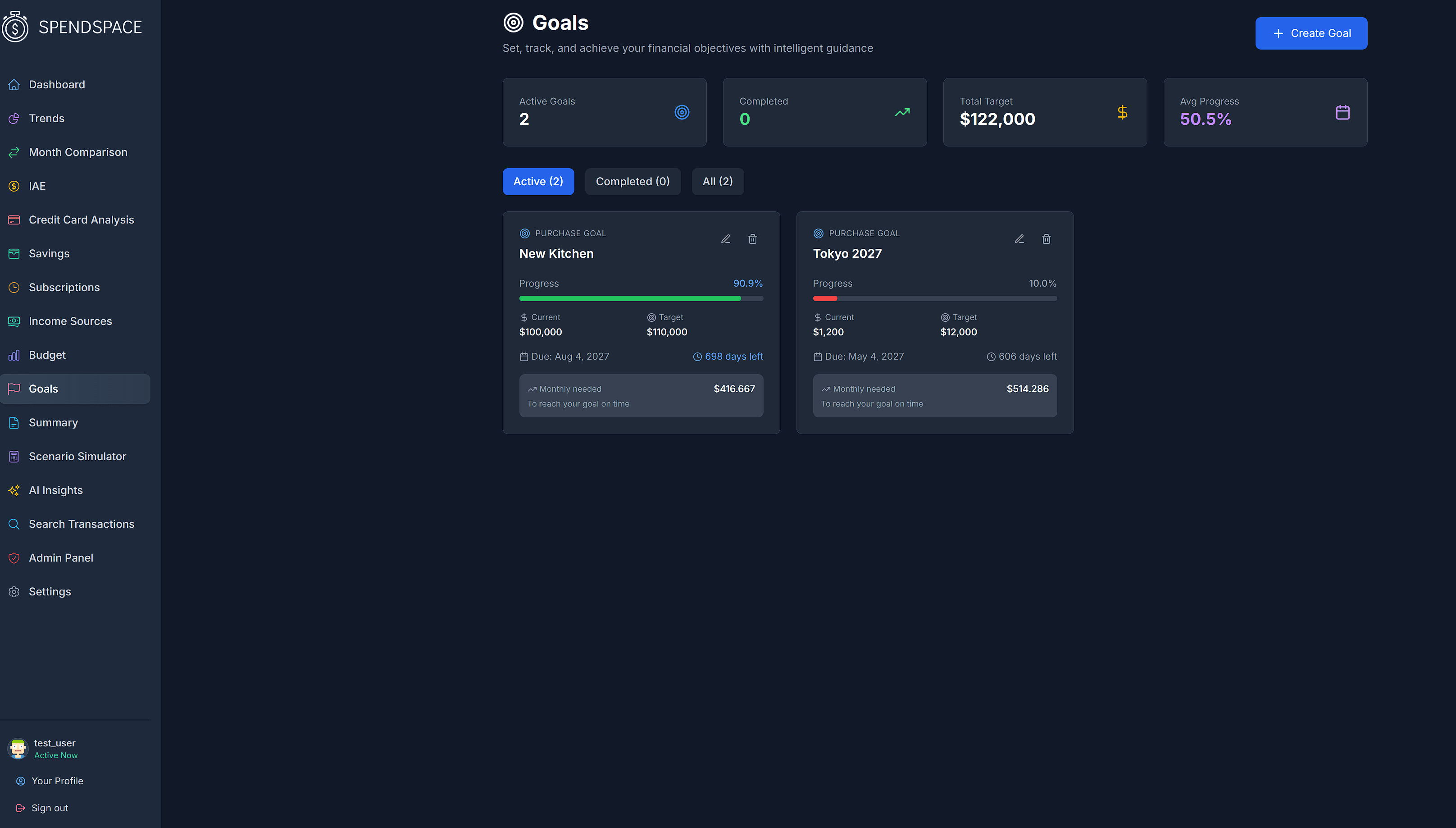
Set & Track Financial Goals
Whether it's saving for a vacation or paying off debt, track your progress and stay motivated.
- Multiple goal types
- Progress milestones
- Timeline projections
SpendSpace vs. The Competition
See why users are switching from traditional budgeting apps
Pricing as of 2024. YNAB offers a 34-day free trial. Monarch offers a 7-day free trial.
Built With Enterprise Technology
We use the same technology trusted by Fortune 500 companies
Bank-Level Security
Google Cloud KMS encryption for all sensitive data
AI-Powered Intelligence
Google Gemini for smart categorization and insights
Investment Tracking
SnapTrade integration for portfolio monitoring
Reliable Infrastructure
PostgreSQL database with Redis caching
Firebase Authentication
Industry-standard user authentication and security
Want to learn more about our security practices?
View Security DetailsSimple Pricing
No hidden fees. No surprises. Start free for 3 months with codeTRYFORFREE3
CSV Import
Perfect for manual transaction management
- Bank CSV file imports
- Manual transaction entry
- Custom expense categories
- Full feature access
- Upgrade anytime
US Banking
Automatic bank sync for US customers

- Everything in CSV plan
- US banks via Stripe
- Investment accounts
- AI-powered insights
- Real-time sync
International
GlobalBank connections worldwide
- Everything in CSV plan
- US, Canada, UK, EU, Asia, NZ
- AI-powered insights
- Hourly sync
All plans include a 3-month free trial with code TRYFORFREE3
Frequently Asked Questions
Have questions about SpendSpace? We've got answers.
SpendSpace provides a comprehensive dashboard that tracks your income, expenses, and savings. It automatically categorizes your transactions, helps you create and stick to budgets, and provides insights into your spending habits. With SpendSpace, you can see your entire financial picture in one place.
Absolutely. We use bank-level encryption to protect your data. SpendSpace employs 256-bit encryption, secure socket layer technology, and strict internal access controls. We never sell your personal information to third parties, and you can delete your data at any time.
SpendSpace uses secure API connections to link with thousands of financial institutions. After you create an account, you'll be guided through the process of securely connecting your accounts. The connection is read-only, which means SpendSpace can never move money or make changes to your accounts.
Yes! SpendSpace is designed to work with multiple financial institutions. You can connect accounts from different banks, credit cards, investment platforms, and more to get a complete view of your finances in one dashboard.
Not yet, but we're working on it!
Come join us on Discord or send us an email at support@spendspace.io
👋 Coming from YNAB?
You're exactly who we built this for. Here's what to expect when you make the switch.
Yes. In YNAB, export your data and open the Register CSV. Because SpendSpace organizes uploads by account type, split it into one file per account — checking accounts in one file, credit cards in another — and upload each under the matching type. Your dates, payees, and amounts import and auto-categorize, so your spending history comes with you.
SpendSpace isn't a YNAB clone — it's a simpler, dashboard-first approach. You connect your accounts (or import CSVs) and SpendSpace automatically categorizes your transactions and shows your income, spending, and trends in one place, with optional zero-based budgeting. Less manual upkeep, more at-a-glance clarity.
Yes. SpendSpace includes an optional zero-based budget where you assign your expected income across categories — the same every-dollar-has-a-job approach you're used to. It's there when you want the structure, but not required to get value from the dashboard.
Set it up as Checking. In SpendSpace, 'Savings' accounts are tracked by balance only and kept out of spending analysis, while 'Checking' accounts are fully transactional and feed your budget. If you actively spend from a high-yield account, treat it as checking so those transactions count.
Not yet — today SpendSpace gives you one unified budget per account. Multiple budgets is one of the most common requests we hear from folks coming from YNAB, and it's on our radar.
SpendSpace separates everyday spending from your net worth. Holdings like iBonds, brokerage, or other assets live under Manual Assets as a value you track, rather than inside your day-to-day budget — so they count toward your total picture without cluttering your spending.
Still have questions? Contact our support team
Ready to Know Your
Money Story?
Get complete visibility into your spending. 3 months free to explore every insight.
TRYFORFREE3at checkout